

Field service businesses live and die by how efficiently they assign and track jobs. Whether you manage HVAC technicians, electricians, plumbers, IT repair teams, or maintenance crews, clear communication and real-time updates are essential. Modern field service dispatch apps have transformed how companies operate, replacing whiteboards, spreadsheets, and endless phone calls with automated scheduling, GPS tracking, and instant job updates.
TLDR: Field service dispatch apps streamline job assignments, optimize technician schedules, and provide real-time tracking for better efficiency and customer satisfaction. The right solution can reduce travel time, cut paperwork, and improve communication between office staff and field technicians. In this article, we explore four powerful dispatch apps that help service businesses assign and track jobs more effectively. Each offers unique strengths depending on your company’s size and operational needs.
Below are four standout field service dispatch apps that help businesses simplify scheduling, track progress in real time, and deliver better service experiences.
1. Jobber
Jobber is a popular field service management platform designed for small to mid-sized service businesses. Its strength lies in balancing ease of use with powerful features that simplify scheduling, dispatching, and invoicing.
Key Features
- Drag-and-drop scheduling calendar
- Real-time job tracking and team updates
- GPS route optimization
- Customer notifications and reminders
- Integrated quoting and invoicing
Jobber’s scheduling interface allows office staff to quickly assign jobs to available technicians. Its drag-and-drop functionality makes last-minute changes painless, which is especially helpful when emergencies arise. As soon as a technician is assigned a job, they receive instant notifications on their mobile device.
Tracking is equally simple. Dispatchers can see job statuses in real time, including when a technician is en route, on site, or has completed the work. Automated customer notifications let clients know when a technician is on the way, improving transparency and reducing customer complaints.
Why It Stands Out
User-friendly design is one of Jobber’s biggest advantages. Teams can get started quickly without intensive training. For growing businesses transitioning away from manual systems, Jobber offers a smooth upgrade path.
Additionally, Jobber integrates estimating, invoicing, and payment processing into one platform. This cuts down on paperwork and ensures dispatch information flows directly into billing, minimizing errors and delays.
Best For
Small to medium-sized service businesses that want a clean, easy-to-implement system for dispatching and tracking jobs.
2. ServiceTitan
ServiceTitan is a comprehensive field service management solution aimed at larger or rapidly growing companies. Known for its robust capabilities, it provides detailed job tracking, advanced reporting, and strong dispatch optimization tools.

Key Features
- Intelligent dispatch board with real-time GPS tracking
- Advanced reporting and performance analytics
- Call booking and customer management tools
- Mobile app for technicians with job history access
- Integration with accounting systems
The dispatch board is one of ServiceTitan’s standout features. It offers a visual overview of all active jobs, technician availability, and location data on a live map. Dispatchers can see who is closest to a job site, which helps minimize travel time and fuel costs.
Technicians benefit from a feature-rich mobile app. They can access detailed job histories, customer notes, equipment data, and previous invoices before arriving on site. This level of information empowers technicians to provide faster and more informed service.
Tracking goes beyond location updates. Managers can analyze productivity metrics such as job completion rates, revenue per technician, and response times. These insights make it easier to identify inefficiencies and improve operations strategically.
Why It Stands Out
ServiceTitan excels in data-driven decision-making. The software doesn’t just help you assign jobs; it also provides deep visibility into how your team performs. Large businesses with multiple technicians and departments will appreciate the detailed reporting and scalability.
Best For
Mid-sized to large field service companies that require advanced dispatch controls, detailed tracking, and performance analytics.
3. WorkflowPros
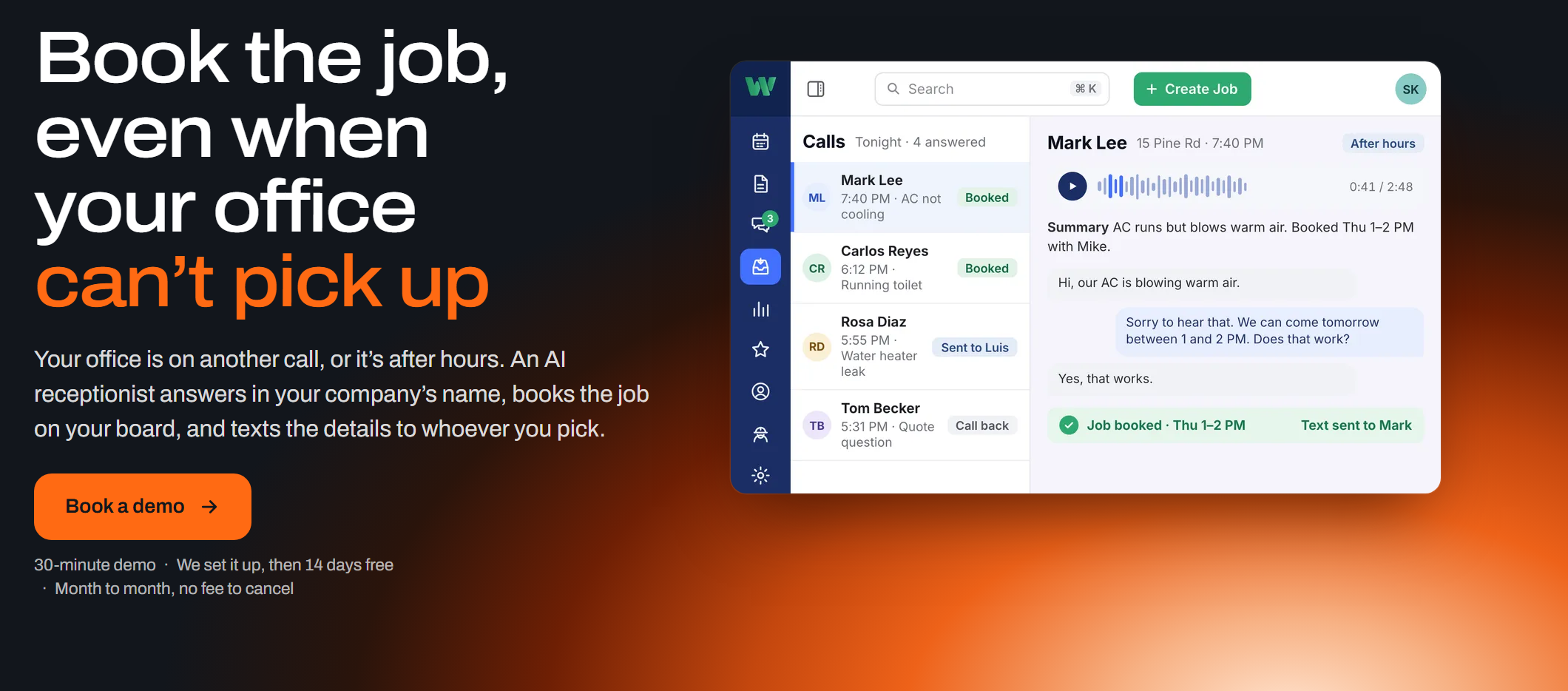
WorkflowPros is a field service management platform that connects incoming service requests with scheduling, technician dispatch, and job completion. It is designed for HVAC, plumbing, electrical, and appliance repair businesses that need office staff and field technicians working from the same records.
Key Features
- Shared scheduling and dispatch board
- Built-in AI receptionist that books service appointments
- Technician mobile apps with offline job access
- Customer and equipment service history
- Estimates, invoicing, and on-site payments
- Two-way QuickBooks Online sync and job reporting
Dispatchers can view technician schedules and move jobs as availability changes. New appointments booked by the AI receptionist appear on the same board, reducing the need to transfer details from voicemail, handwritten notes, or a separate answering service.
In the field, technicians can review the address, service history, and job instructions from their phones. Checklists, photos, and job updates keep the office informed, while estimates and payments can be handled during the visit.
Why It Stands Out
WorkflowPros connects call answering with the dispatch workflow. When office staff are on another call or the business is closed, the AI receptionist collects the customer’s information and books an available appointment. The dispatcher receives a job record with the details needed to coordinate the visit.
The same system supports the work that follows, from customer history and technician documentation to invoicing and accounting sync. This makes it useful for teams looking to reduce repeated data entry between booking, dispatch, and billing.
Best For
Home service companies that want AI-assisted call intake, technician scheduling, and field job management in one platform.
4. Housecall Pro
Housecall Pro is another powerful yet accessible dispatch app designed with simplicity and automation in mind. It focuses on streamlining daily tasks while improving communication between office staff, technicians, and customers.

Key Features
- Automated job scheduling and confirmations
- GPS tracking and technician route visibility
- Online booking portal for customers
- Job status updates and photo attachments
- Estimates, invoices, and payment processing
Housecall Pro simplifies dispatching with automation. When a customer books a service online, the system can automatically assign or notify available technicians. Office staff can view everyone’s schedule in a centralized dashboard and adjust assignments as needed.
Real-time GPS tracking enables dispatchers to monitor technician locations throughout the day. Customers receive text notifications when a technician is on the way, often including a photo and brief bio of the assigned professional. This builds trust and enhances the customer experience.
The ability to attach photos and notes to job records ensures that documentation is thorough and easy to access. This is particularly useful for repair work that may require future follow-ups or warranty tracking.
Why It Stands Out
Housecall Pro emphasizes automation and customer communication. By reducing manual scheduling tasks and improving transparency, it saves time while elevating professionalism.
Best For
Service businesses that value automation, customer experience, and an intuitive mobile-first design.
Key Benefits of Using Field Service Dispatch Apps
No matter which app you choose, modern dispatch software offers significant operational advantages. Here are some of the most impactful benefits:
1. Faster Job Assignment
Manual scheduling often leads to conflicting bookings and wasted time. Dispatch apps automate the process, showing technician availability and skill sets in real time.
2. Improved Route Efficiency
GPS-based dispatching reduces unnecessary travel by assigning jobs to the nearest available technician. This saves fuel, minimizes vehicle wear, and increases the number of daily appointments.
3. Real-Time Visibility
Managers can track job progress instantly. They know who is on schedule, who is delayed, and where adjustments are needed.
4. Better Communication
Technicians receive job details directly within mobile apps, eliminating misunderstandings. Customers receive automated updates about appointment confirmations and arrival times.
5. Reduced Paperwork
Digital job forms, electronic signatures, and integrated invoicing mean less administrative work and fewer errors.
How to Choose the Right Dispatch App
When selecting a field service dispatch app, consider these factors:
- Company size: Smaller teams may prefer intuitive systems like Jobber or Housecall Pro, while larger enterprises may require ServiceTitan’s advanced capabilities.
- Budget: Pricing structures vary widely depending on features and number of users.
- Integration needs: Make sure the app integrates with your accounting, CRM, or payment systems.
- Ease of use: A complicated system can slow adoption and frustrate your team.
- Scalability: Choose a solution that can grow alongside your business.
Many providers offer demos or trial periods. Testing the interface with both dispatch staff and field technicians can reveal whether the app suits your workflow.
Final Thoughts
In today’s competitive service landscape, speed and visibility matter more than ever. Customers expect precise appointment windows, clear communication, and efficient service delivery. Dispatch apps like Jobber, ServiceTitan, and Housecall Pro empower businesses to meet those expectations by automating scheduling, tracking jobs in real time, and connecting office teams with field technicians.
The right solution can dramatically reduce inefficiencies, lower operational costs, and improve customer satisfaction. More importantly, it frees up your team to focus on delivering high-quality service rather than juggling spreadsheets and phone calls.
For field service businesses aiming to grow and stay competitive, investing in a robust dispatch app is no longer optional — it’s a strategic necessity.