
Treat Footstreams.co as unknown until the data proves otherwise. Start with domain ownership, technical signals, indexed pages, backlinks, traffic estimates, and search results. Do not judge the site by its homepage alone. A small domain can look quiet on the surface while ranking for odd keywords, redirecting users, or collecting links from risky sources.
TLDR: Researching Footstreams.co means checking who controls the domain, what pages are indexed, what keywords it appears for, and whether its backlink profile looks natural. For example, a quick 45-minute audit might find 126 indexed URLs, 18 referring domains, and 72% of visible search demand tied to one brand-like query. If a site has low authority but sudden traffic spikes, treat that as a signal to inspect redirects, copied content, and suspicious links. The goal is not to “trust” or “block” the site right away, but to build a clean evidence file.
Start with the domain, not the design
A website can look polished and still have weak signals. It can also look plain and be perfectly legitimate. That is why the first step is boring but useful: check the domain itself.
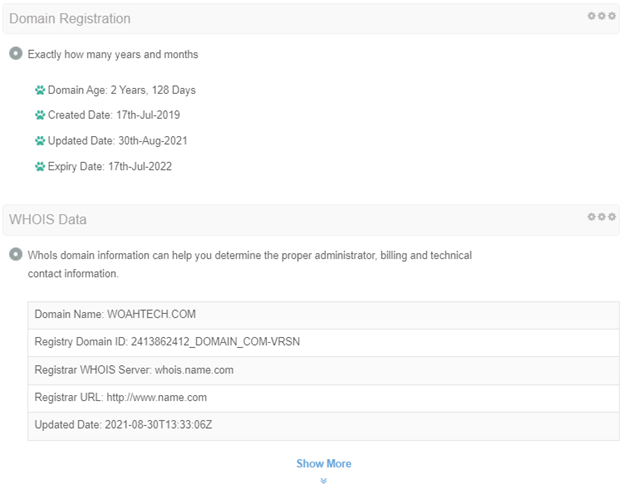
- WHOIS data: Look for creation date, registrar, privacy protection, and recent ownership changes.
- DNS records: Check nameservers, mail records, CDN usage, and hosting clues.
- SSL certificate: See when it was issued and whether it matches the domain.
- Archive history: Use web archives to see what the site used to show.
If Footstreams.co was registered recently, changed content several times, or previously served unrelated pages, that matters. It does not prove anything by itself. It simply tells you to slow down and collect more evidence.
Check what search engines actually see
The homepage is only one page. Search engines may have discovered many more. Use simple search operators first. They are fast, free, and often more useful than a bloated dashboard.
- site:footstreams.co to estimate indexed pages.
- “footstreams.co” to find mentions and exact references.
- inurl:footstreams to catch related URLs and copies.
- cache-like views and snippets where available, to see how pages are presented.
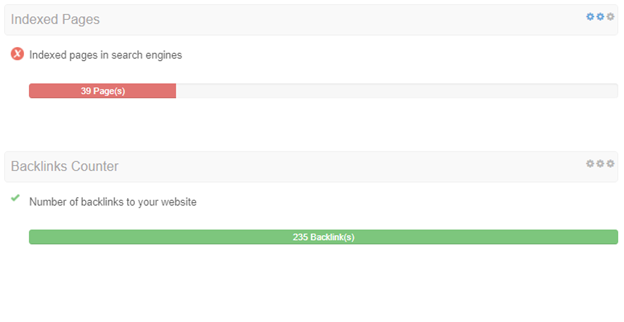
Do not obsess over the exact indexed page count. Google’s numbers can be messy. What matters is the pattern. Are there only a few core pages? Are there hundreds of thin tag pages? Are search snippets clear, or do they look auto-generated?
Honestly, it feels like some SEO tools add confusion here. One tool may show 40 pages. Another may show 400. Expect to waste time on mismatched numbers. Use them as clues, not as final answers.
Build a search visibility profile
A search visibility profile explains how a domain appears in search. It should answer three questions: what ranks, why it ranks, and whether the ranking pattern seems stable.
For Footstreams.co, review these areas:
- Ranking keywords: Are terms branded, generic, misspelled, or related to media streams?
- Top pages: Which URLs receive the most estimated clicks?
- Country split: Does visibility come from one region or many?
- Traffic trend: Is growth gradual, flat, or sudden?
- SERP features: Does the domain appear in videos, sitelinks, snippets, or only basic blue links?
A healthy site often has a natural mix of branded and non-branded keywords. A questionable pattern might show rankings for unrelated high-volume terms, strange doorway pages, or sudden visibility after months of silence.
Review traffic estimates with caution
Third-party traffic tools are useful, but they are guesses. Treat them like weather forecasts, not bank statements. Still, the direction can tell a story.
For example, if a tool estimates Footstreams.co at 9,000 monthly organic visits in March, 11,500 in April, and 10,800 in May, that looks relatively steady. If it jumps from 300 to 80,000 visits in one month, ask why. Maybe a page went viral. Maybe the site changed topic. Maybe redirects or scraped pages are involved.
Useful metrics include:
- Estimated organic sessions by month.
- Keyword count across top 3, top 10, and top 100 rankings.
- Click concentration across top pages.
- Branded versus generic demand.
If one page gets 85% of all estimated organic traffic, inspect it first. A normal site can have a star page. But extreme concentration can also mean the rest of the site has little value.

Inspect backlinks without getting fooled
Backlinks can reveal reputation, promotion, spam, or manipulation. Start with the number of referring domains, then check quality by hand. Do not stop at domain authority scores. They can hide weak links.
Look for:
- Relevant links: Mentions from sites in a related topic area.
- Anchor text: Natural anchors such as brand names, URLs, and plain phrases.
- Spam anchors: Strange commercial terms, adult terms, pills, betting, or unrelated phrases.
- Link velocity: Sudden bursts of hundreds of links in a few days.
- Sitewide links: Footer or sidebar links repeated across many pages.
The catch is that backlink tools often report old links that no longer exist. Click samples manually. If 7 out of 10 “best” links are dead, redirected, or placed on junk pages, the profile is weaker than the score suggests.
Check safety and reputation signals
For an unfamiliar domain, security checks are not optional. Use multiple sources, because one scanner can miss what another catches.
- Google Safe Browsing for malware and phishing warnings.
- VirusTotal for scanner results and historical detections.
- URLScan for page behavior, scripts, requests, and screenshots.
- Browser warnings when visiting the site in a controlled environment.
- Reputation forums for user complaints or repeated reports.
Be careful with sites connected to video streams, downloads, popups, or aggressive advertising. Some are fine. Others send users through layers of redirects that change by country, device, or time of day.
Analyze the content footprint
Search visibility depends on content. Check whether Footstreams.co has original pages, thin pages, copied pages, or pages generated from templates.
Ask these questions:
- Are titles unique and readable?
- Do pages answer a clear search intent?
- Is there author, contact, or business information?
- Are there legal pages such as privacy policy and terms?
- Does the site copy text from other domains?
Thin content is not always malicious. Sometimes it is just lazy. Still, search engines tend to reward sites that show purpose, structure, and trust signals. If Footstreams.co has many near-empty pages indexed, that weakens the profile.
Create a simple scoring sheet
After collecting data, turn it into a practical score. Keep it simple. A spreadsheet with five sections is enough.
| Area | What to check | Risk signal |
|---|---|---|
| Domain | Age, ownership, DNS, SSL | Very recent changes |
| Indexing | Number and type of indexed pages | Many thin or odd pages |
| Visibility | Keywords, countries, top URLs | Sudden unexplained spikes |
| Backlinks | Referring domains and anchors | Spam anchors or link bursts |
| Safety | Scanner results and redirects | Warnings or suspicious scripts |
What a quick Footstreams.co audit might look like
Suppose an analyst checks Footstreams.co for a client that noticed referral traffic from the domain. In 60 minutes, the analyst records 34 indexed pages, 21 referring domains, three exact-match brand mentions, and one traffic spike of 240% over two weeks. Two scanners show no malware, but URLScan reveals several third-party ad scripts and two redirect chains. That does not create a final verdict. It creates a clear next step: monitor the domain, block risky referral paths if needed, and recheck search visibility in 30 days.
The best website research is not dramatic. It is structured. Start with the domain, confirm what search engines see, review visibility patterns, test backlinks, and check safety signals. With Footstreams.co, the right question is not “does it look real?” The better question is: does the evidence behave like a trustworthy site?