
Build one weekly content system first, then resize it for each platform. Do not start with ten random post ideas. Start with content buckets, posting days, and a simple repeatable flow.
TLDR: Pick 4 to 6 content buckets, plan one week at a time, and turn each main idea into smaller posts for every platform. For example, a bakery could turn one “how we make sourdough” video into a Reel, a TikTok, a carousel, a Story poll, and a LinkedIn post about small business lessons. If that bakery posts 5 times per week and reuses 60% of each idea, it may cut planning time from 5 hours to about 2 hours. Consistency beats chaos. Every time.
Start With Content Buckets
Content buckets are your repeatable themes. They stop the classic “what do we post today?” panic. That panic is not cute. It eats your morning.
Choose a few buckets that match your brand. Keep them simple.
- Teach: tips, how tos, checklists, common mistakes.
- Show: behind the scenes, product demos, team moments.
- Prove: reviews, results, before and after posts.
- Connect: questions, stories, opinions, community posts.
- Sell: offers, launches, bundles, limited deals.
- Entertain: memes, trends, relatable moments.
You do not need all six. Most brands do well with four. A fitness coach might use teach, prove, connect, and sell. A coffee shop might use show, entertain, connect, and sell.

Use One Big Idea Across Many Platforms
This is where the magic happens. One idea should not live in one place only. That is wasteful.
Say your big idea is: “Three mistakes people make when choosing running shoes.”
Now split it up:
- Instagram Reel: quick video with the three mistakes.
- TikTok: fun version with a “stop doing this” hook.
- LinkedIn: post about how bad gear affects performance.
- Facebook: longer caption with a question at the end.
- Pinterest: checklist graphic for shoe shopping.
- Stories: poll asking, “Do your shoes hurt after a run?”
Same idea. Different outfit. That is the whole trick.
Honestly, it feels like some teams create content as if every app needs a brand new brain. It does not. Each app just needs the idea shaped the right way.
Know What Each Platform Wants
Every platform has its own vibe. Do not post the exact same thing everywhere and hope for applause. People can tell.
- Instagram: clean visuals, Reels, carousels, Stories, quick value.
- TikTok: personality, trends, short lessons, human moments.
- LinkedIn: lessons, opinions, wins, hiring, business stories.
- Facebook: community, events, groups, local updates, discussion.
- Pinterest: search-friendly ideas, guides, lists, inspiration.
- YouTube Shorts: strong hooks, useful clips, repeatable formats.
You can post the same topic. Just adjust the format, tone, and length.
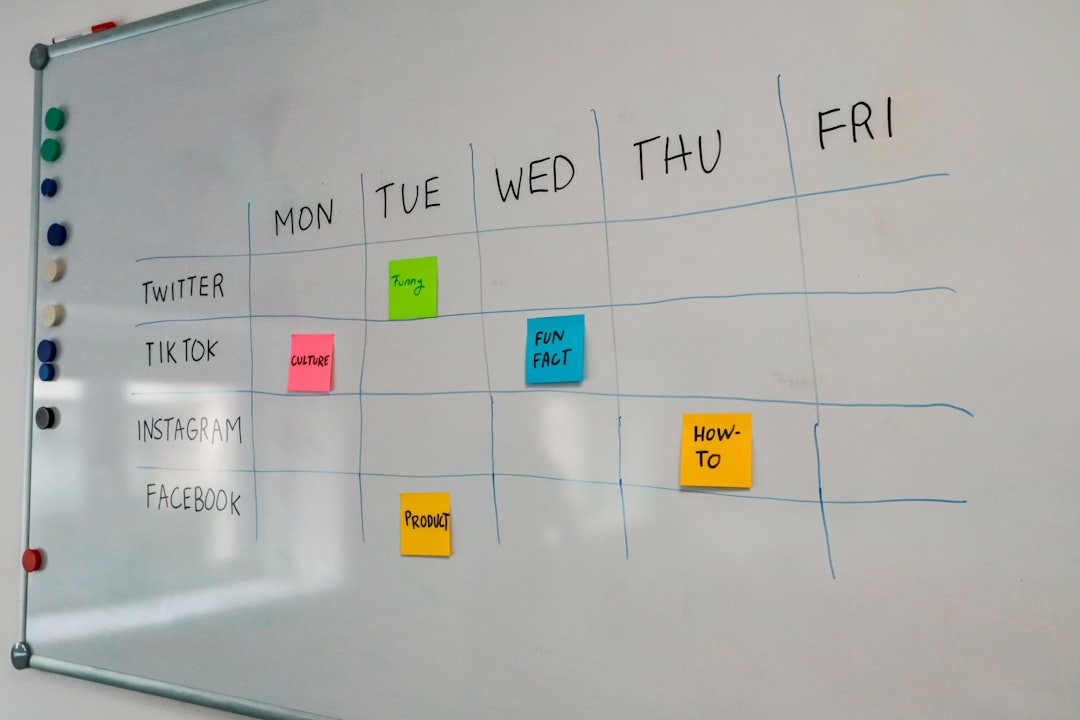
Build a Simple Weekly Calendar
Do not make the calendar scary. Make it boring. Boring works.
Here is a simple weekly plan:
- Monday: teach something useful.
- Tuesday: show behind the scenes.
- Wednesday: share proof or a customer story.
- Thursday: ask a question or start a conversation.
- Friday: sell something clearly.
- Weekend: post light content, a recap, or a fun trend.
That is enough for most brands. You can post daily later. First, become consistent.
If you have a small team, plan two weeks at a time. If you work alone, plan one week. Expect to waste time on fancy calendar tools if your process is messy. A tool will not save a broken system. It will just load slowly while you sigh.
Create a Content Idea Bank
Your brain is not a storage cabinet. Stop treating it like one.
Keep a running list of ideas. Use a spreadsheet, notes app, project board, or plain document. Add ideas when they appear.
Good sources include:
- Customer questions.
- Sales objections.
- Old blog posts.
- Podcast clips.
- Product updates.
- Team stories.
- Industry myths.
- Comments on past posts.
- Competitor posts that sparked replies.
The best content ideas often come from normal conversations. If three customers ask the same question, that is a post. Maybe five posts.
Use Repeatable Post Formats
Repeatable formats make content easier. They also train your audience. People start to know what to expect.
Try a few of these:
- Myth vs fact: great for education.
- Before and after: great for proof.
- Three quick tips: easy to scan.
- One mistake to avoid: strong hook.
- Tool of the week: useful and simple.
- Customer question: direct and relatable.
- Behind the post: show the process.
Formats remove guesswork. They also make batching easier.
Batch Your Content Without Becoming a Robot
Batching means making content in groups. It saves time. It also keeps your week from turning into a content tornado.
Try this workflow:
- Monday: choose topics for next week.
- Tuesday: write captions and hooks.
- Wednesday: record videos or design graphics.
- Thursday: schedule posts.
- Friday: review numbers and save ideas.
Leave room for fresh posts too. Trends, news, and funny moments do not always wait for your calendar. Keep 20% of your calendar open for timely content.
Match Content to Goals
Every post needs a job. Not every post needs to sell. That would be exhausting.
Use this mix:
- 40% awareness: reach new people.
- 30% trust: teach, prove, and answer questions.
- 20% connection: polls, stories, opinions, community posts.
- 10% sales: offers, demos, booking links, product pushes.
This keeps your feed balanced. It also stops your account from sounding like a coupon machine with Wi Fi.
Track Simple Numbers
You do not need a giant report. Track the numbers that show what people liked and what helped the business.
- Reach: how many people saw it.
- Engagement rate: likes, comments, shares, saves.
- Clicks: traffic to your site or offer.
- Replies: great for Stories and direct messages.
- Conversions: signups, purchases, bookings, leads.
Review results once per week. Pick winners. Repeat them with a new angle.
For example, if your “mistakes to avoid” posts get 35% more saves than your quote posts, make more mistake posts. Simple. No drama.
Make a Monthly Theme
A monthly theme gives your calendar a backbone. It also makes planning easier.
Examples:
- January: fresh starts and beginner tips.
- February: customer love and success stories.
- March: spring prep and new habits.
- April: common mistakes and fixes.
Then each weekly post ties back to that theme. Your content feels connected. Your team stops guessing. Your audience gets a clear message.
Keep the Calendar Easy to Read
Your calendar should show the basics at a glance.
- Post date.
- Platform.
- Content bucket.
- Post format.
- Caption draft.
- Visual or video link.
- Status.
- Goal.
Use status labels like idea, writing, design, scheduled, posted, and reviewed. Keep it clean. If it takes 18 clicks to find one caption, the system is annoying you, not helping you.
Final Tip: Repeat More Than You Think
Your audience does not see every post. Even loyal followers miss things. So repeat strong ideas.
Turn one winning post into a carousel, a short video, a quote graphic, a Story, and an email. Change the hook. Keep the message.
A consistent calendar is not about posting more noise. It is about making your best ideas easier to find, easier to plan, and easier to share.