
Networks can feel like a busy city. Data is driving around in tiny cars. Routers are traffic lights. Devices are buildings. A port ID is like a door number, parking spot, or lane label. It helps data find the right place to go.
TLDR: A port ID helps identify where network traffic should go. In many cases, it means a port number, such as 80 for websites or 443 for secure websites. It can also mean a physical port on a switch or router. Think of it as a label that keeps network traffic from getting lost.
What is a port ID?
A port ID is a name or number used to identify a port in a network. That sounds simple. It is. But there is one tiny twist.
The term can mean different things based on the context.
- A software port ID: This is usually a TCP or UDP port number.
- A hardware port ID: This is a label for a physical port on a device.
- A protocol port ID: This is used by network tools and protocols to describe connections.
Do not worry. We will break it down with examples. No scary tech fog here.

Port ID as a software port number
This is the most common meaning. A software port ID is a number that tells a computer which app or service should receive the data.
Your computer can do many things at once. It can load a website. It can send email. It can stream music. It can join a video call. All of that traffic uses the same network connection.
So how does the computer know what data belongs where?
It uses IP addresses and port numbers.
The IP address finds the device. The port number finds the service on that device.
Here is a simple example:
- IP address: The street address of a building.
- Port number: The room number inside the building.
If the IP address is where to go, the port ID is which door to knock on.
Common port ID examples
Some port numbers are famous. They are like celebrity doors in the networking world.
- Port 80: Used for regular web traffic, called HTTP.
- Port 443: Used for secure web traffic, called HTTPS.
- Port 25: Used for sending email with SMTP.
- Port 53: Used for DNS, which turns names into IP addresses.
- Port 22: Used for SSH, a secure remote login tool.
- Port 21: Used for FTP, an older file transfer method.
When you visit a secure website, your browser usually talks to port 443. You do not type it. The browser handles it quietly. Very polite.
For example, this:
https://example.com
usually means:
https://example.com:443
The :443 is the port ID. It is often hidden because it is the default for HTTPS.
TCP and UDP ports
Most software port IDs belong to either TCP or UDP.
TCP is careful. It checks that data arrives correctly. It is like sending a package with tracking. Websites, email, and file transfers often use TCP.
UDP is faster and lighter. It does not check every little thing. It is like shouting across a room. Online games, video calls, and live streams often use UDP.
Both TCP and UDP can use port numbers. So TCP port 80 and UDP port 80 are not exactly the same thing. They are separate lanes.
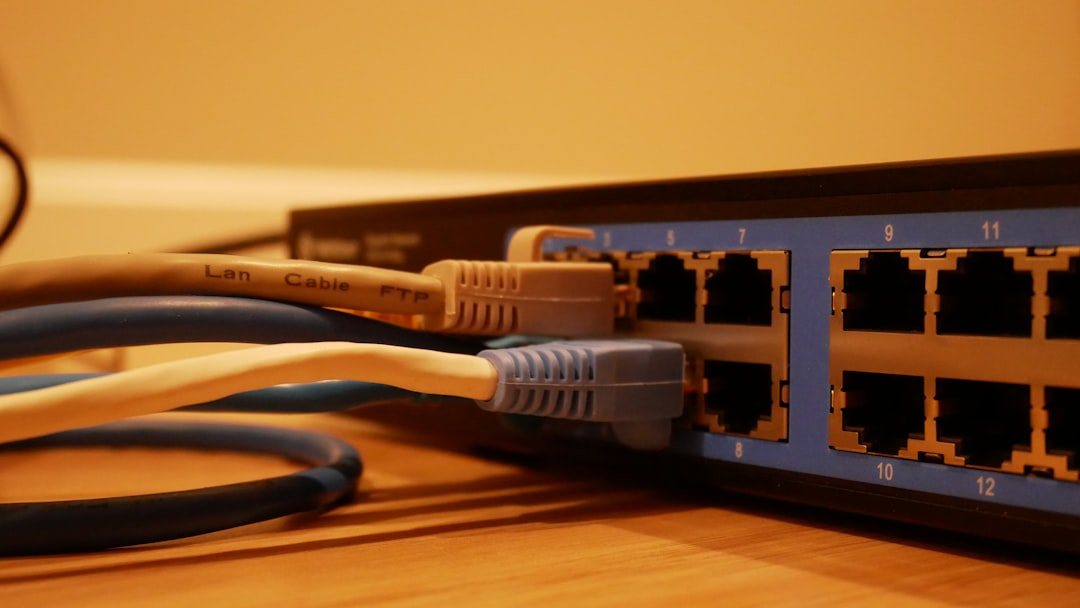
Port ID as a physical port
Now let us talk about hardware. A physical port is a real socket on a network device. You can plug a cable into it.
Example devices include:
- Switches
- Routers
- Firewalls
- Servers
- Wi Fi access points
A switch might have 24 Ethernet ports. Each one needs a label. That label may be called a port ID.
For example:
- Port 1: Connected to the office printer.
- Port 2: Connected to a desktop computer.
- Port 3: Connected to a wireless access point.
- Port 24: Connected to another switch.
In this case, the port ID does not mean a TCP or UDP number. It means a physical location on the device.
This is important for troubleshooting. If the printer stops working, a network admin may check switch port 1. Maybe the cable is loose. Maybe the port is disabled. Maybe someone unplugged it to charge a phone. Classic office mystery.
Port ID in switches and network protocols
Some network protocols also use port IDs. One common example is STP, or Spanning Tree Protocol.
STP helps switches avoid loops. A loop happens when network traffic spins around forever. That is bad. It is like a hamster wheel for data. Cute image. Terrible network.
In STP, switches use details like bridge ID and port ID. These values help decide which ports should forward traffic and which should stay quiet.
A port ID in this context may include a port priority and port number. It helps switches make smart choices. You may not see this every day. But it matters in larger networks.
Why port IDs matter
Port IDs keep networks organized. Without them, data would wander around like a confused tourist with no map.
They help with:
- Routing traffic: Data reaches the right app or service.
- Security: Firewalls can allow or block certain ports.
- Troubleshooting: Admins can find bad cables or broken services.
- Monitoring: Tools can see which ports are busy.
- Remote access: Services like SSH use known ports.
For example, a firewall might allow web traffic on ports 80 and 443. It might block port 23 because Telnet is old and unsafe. Good firewall. Nice job.
A simple real world example
Imagine you open a website. Here is what happens in a simple way.
- You type a website name into your browser.
- DNS finds the IP address for that website.
- Your browser connects to the server.
- It uses port 443 for HTTPS.
- The server sends the web page back.
- Your browser shows the page.
The IP address found the server. The port ID found the secure web service. Teamwork!
Another example: online gaming
Now imagine an online game. The game needs fast updates. It needs to know where each player is. It needs to show movement quickly.
Many games use UDP ports. Why? Speed matters. If one tiny update is lost, the game can keep going. You do not want your dragon battle paused because one packet got shy.
The game may use a specific port ID. Your router may need to allow that port. This is why some games mention port forwarding.
Port forwarding tells your router, “When traffic arrives on this port, send it to this device.” It is like giving the router a little delivery note.
Port ID versus IP address
These two are friends, but they are not the same.
- IP address: Identifies a device on a network.
- Port ID: Identifies a service, app, or physical port.
Here is a fun way to remember it:
IP address = building.
Port ID = door.
If you only know the building, you still need the right door. Otherwise, you may end up in the mail room instead of the pizza party.
Final thoughts
A port ID is a small label with a big job. It helps network traffic get to the right place. Sometimes it means a software port number, like 443 for HTTPS. Sometimes it means a physical switch port, like port 12 on a network switch.
The idea is simple. Networks need labels. Port IDs are some of the most useful labels around. They keep the digital world tidy, quick, and less weird. And in networking, less weird is always a win.